

Getting started
Your dashboard
A tour of where everything lives when you log in.
Your dashboard is home base. Every time you log in to Plot, this is where you land — and everything you've ever made, plus everything shared with you, is one scroll away.
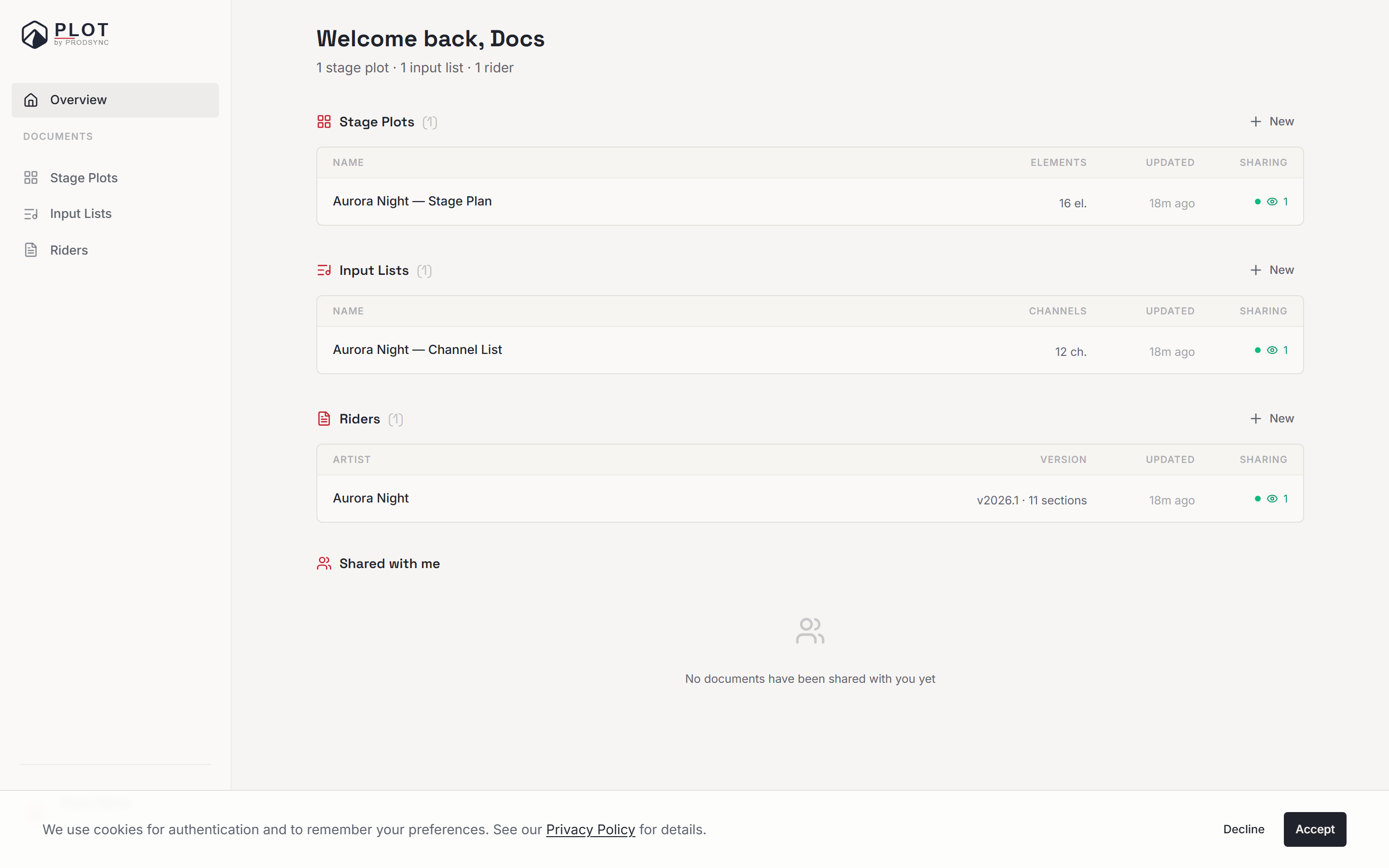
Only you can see your dashboard. Nothing on this page is public. Documents only go out when you decide to share them.
The sidebar
Navigation lives in a fixed sidebar down the left-hand side. On a phone it collapses behind the menu button in the top corner.
- Overview — the page you land on. Everything you own, grouped by type.
- Documents — Riders, Stage Plots, and Input Lists. Each one opens a full list of just that type.
- Help — a link to these docs, and Report a problem, which opens an email to us.
- At the bottom: your name, Settings, the light/dark toggle, and Sign out.
Riders sit at the top of the Documents group because that's what most people open first. The order is the same on every page, so once you've found something you'll find it again in the same spot.
The overview
The overview greets you by name, with a one-line summary underneath — how many stage plots, input lists, and riders you have. Below that, three groups in the same order as the sidebar: Riders, Stage Plots, Input Lists.
Each group is a small table showing your five most recent documents. If you have more, a Show the N remaining link expands the rest, and Show less folds it back up. Every group has its own New button in the top-right corner, so you never have to go looking for the right create dialog.
The columns differ slightly by type:
- Riders — artist, version and section count, when it was last updated, sharing.
- Stage plots — name, element count, last updated, sharing.
- Input lists — name, channel count, last updated, sharing.
Reading the sharing column
That last column is a quick health check on who can see a document:
- A green dot with an eye and a number — the public link is on and it's been opened that many times. Hover for when it was last viewed.
- An amber dot marked Public — the link is on, but nobody has opened it yet.
- A blue people icon with a number — not public, but shared with that many collaborators.
- A dash — private. Nobody but you.
It's the fastest way to spot a rider you meant to unshare after a tour ended.
Shared links and Shared with me
Below the three groups sit two more sections:
Shared links lists every document you've made public, with its link, so you can copy or revoke without opening each document. It only appears when you actually have public links.
Shared with me lists documents other people have invited you to, in the same table layout as your own. Whether you're an editor or a viewer, it shows up here.
Making something new
Each group's New button opens the right dialog for that type:
New rider
Opens the rider wizard — a short set of questions that picks your starting sections for you.New stage plot
Opens the stage plot dialog, where you name it and pick a stage size, or build one from a photo.New input list
Opens the input list dialog, where you name it and optionally import an existing list.
Whichever you pick, the document opens in its editor the moment it's created.
Settings
Settings in the sidebar footer holds three cards: Account (your email, password, and interface language), Help & support (docs and a support link), and a Danger zone where you can export all your data as a ZIP or delete your account. Nothing there affects the content of your documents.
If the dashboard doesn't load
If something goes wrong fetching your documents, you'll get a short message and a Try again button rather than an empty page. If it keeps failing, that's worth an email to us — an empty dashboard is never correct if you've made something.
What's next
Now that you know your way around, try creating your first stage plot — it's the quickest way to get a feel for how Plot works.